Getting The Word Out With Jetpack: Sharing, Subscribers, Social Media Networks

Jetpack WordPress Plugin Social Features

This is a guest post from my friend and super-talented WordPress developer, Suzette Franck. I’ve mentioned the Jetpack plugin before and in this post Suzette will take you deeper into it’s social marketing features.
****
Let’s face it, no matter how pretty your blog or website is, people come back for fresh, compelling, unique and informative content. While there are various services that will accomplish the same functionality, never before has posting to all the networks simultaneously been make simpler than with the magic of the plugin Jetpack. Jetpack is chock full of goodies like the Publicize, Sharing and Subscriptions features that can help the most amount of people see your unique content in your social network. Support for posting to Facebook, Twitter, Tumblr, LinkedIn,  and Yahoo, as well as share buttons for the major networks are all included in this no cost but priceless plugin.

What is Jetpack?

Jetpack (latest version is 2.0) is a free add-on suite of plugins once only available to WordPress.com users made available for your self-hosted blog. If your blog is hosted at WordPress.com, you do not need this add-on to access these features, but if you are self-hosting your blog, for example, at Media Temple, WPEngine, HostGator, Blue Host, etc. you will need to download, install, and activate this plugin to have it provide the features we will be covering, Also, you will be required to have a WordPress.com account, so that all of your subscriptions and stats can be accessed centrally right form the WordPress.com dashboard. I will walk you through the installation and configuration process and get you up and running in no time posting your unique content to your followers. 

Read more

Enhancing Your WordPress Gallery

enhanced use of WordPress gallery

I’ve posted previously about the in-built gallery feature of WordPress,and some of the simple things you can do using the shortcode. With this post I wanted to share a few more tips and some apparently less well-known features such as using multiple galleries on one page.

BONUS PDF: Resources for finding, editing and optimizing images, and tools for creating social images.

Multiple Galleries In One Page/Post

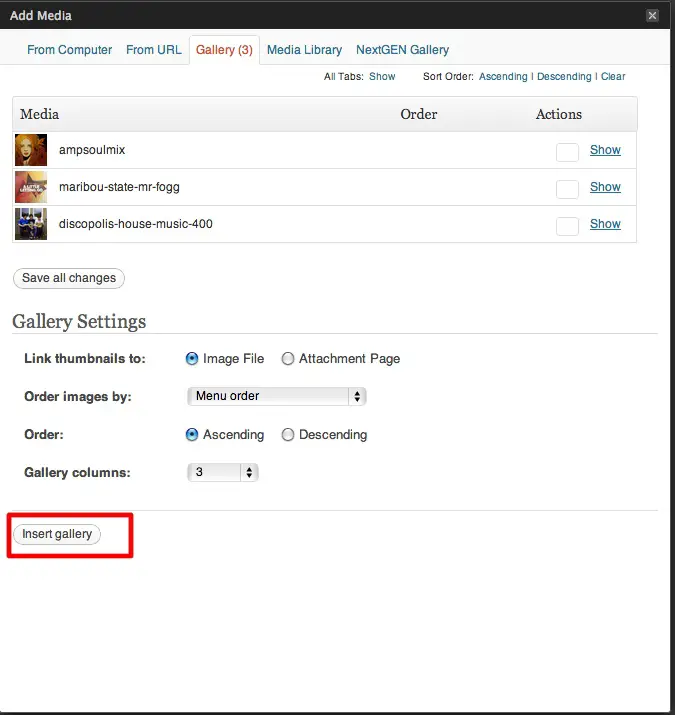
In WordPress terms, when you upload images to a specific post, those images are attached to the post and become part of the default gallery for that post which you can insert into your post from the media uploader.

Basic WordPress Gallery

If you only use the media uploader, it would appear that you can only insert one gallery per post – the images you’ve attached to that specific post. But what if you want to include multiple galleries in one post? It doesn’t seem possible using the standard media uploader, but if you use the gallery shortcode you can do it easily. (I describe the basic use of the gallery shortcode here)

Read more

Intro To Podcasting With WordPress

podcasting with WordPress

This a guest post by my friend and multimedia WordPress wizard, Jason Tucker. He streams live and archives the OC WordPress meetup group, and has recently launched a new Google Hangout and podcast show called WP Watercooler which you can watch live on Mondays at 11am PST, or you can catch the archive on the website and download the podcast via iTunes. He kindly agreed to share some of his wisdom here. Now over to Jason……

****

So you want to learn how to podcast? In this post I’ll go over some of the basics of podcasting using WordPress, a mic and some audio or video recording software.

What is a podcast?

Before I get into how to start your own podcast I think we should define what a podcast is. Wikipedia states the following:

A podcast is a type of digital media consisting of an episodic series of audio, video, PDF, or ePub files subscribed to and downloaded through web syndication or streamed online to a computer or mobile device. The word is a neologism derived from “broadcast” and “pod” from the success of the iPod, as podcasts are often listened to on portable media players.

So, in plain English,  a podcast is a way for you to receive and then consume typically audio or video in an episodic fashion. I listen to quite a few podcasts –  some are news focused, and others are either short stories or very long shows. I’ve listened to podcasts that are 5 minutes long all the way to 2 hours long. Either way, think of a podcast as setting a DVR to receive a show someone records and makes available at various intervals, typically every week. 

Read more

First Look At WPMU’s Appointments+ WordPress Plugin

Appointments Plus WordPress Plugin

WPMU is a mainstay of the wordpress community. As their name suggests, they began as specialists in blogging about and writing plugins for wp multiuser setups (now known as Multisite). These days they cover pretty much all aspects of WordPress. If you’ve ever Googl-ed anything about WordPress, chances are you’ve landed on their blog at some point. Through their offshoot Premium WPMU Dev, they also have a killer suite of plugins and themes that they are always adding to.Their plugins are generally well thought out, well-coded and they have support. Most of their plugins are just $19, or you can get an “all-you-can-eat” membership which is great for developers and people that build a lot of WordPress sites.

I recently took their Appointments+ plugin (aff. link)  for a test drive. Online booking and scheduling is an area in which WordPress is still a little lacking. There are numerous solutions out there, but not really a killer one yet. When I first tried Appointments+ I wasn’t sure how it would stack up, and while there’s probably room for it to grow, as I tried a couple of other popular solutions I realized that it’s actually pretty decent. Now I haven’t used it consistently for a long time, so these are just my initial impressions. When I have it running on some live sites, I’ll report back how it holds up over time.

Read more