
How To Add The Official LinkedIn Share Button To WordPress Blogs
LinkedIn have joined Facebook and Twitter in releasing an “official” share button. Note that this doesn’t really represent groundbreaking functionality – many social bookmarking plugins allow you to share posts to LinkedIn. But this official version does come with the option of a ‘share’ count, for that all-important ‘social proof’, and 3 clean button designs. I’m sure plugins will pop up momentarily to enable adding the button to your WordPress site, but if you’re feeling geeky and want to add it right away, here’s how.
There are three versions of the button:
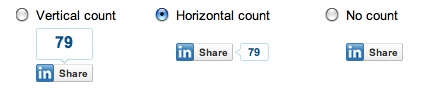
In order to add the button to your site, you will have to edit your theme files slightly. So let’s say you want to add it to your Single Posts, you would open up single.php and add one of the following sets of code inside the Loop.
Vertical Count Button
<script type="text/javascript" src="http://platform.linkedin.com/in.js"></script><script type="in/share" data-url="<?php the_permalink(); ?>" data-counter="top"></script> |
Horizontal Count Button
<script type="text/javascript" src="http://platform.linkedin.com/in.js"></script><script type="in/share" data-url="<?php the_permalink(); ?>" data-counter="right"></script> |
No Count Button
<script type="text/javascript" src="http://platform.linkedin.com/in.js"></script><script type="in/share" data-url="<?php the_permalink(); ?>"</script> |
Questions? Leave a comment!
Watch the video demonstrating how to do this
*header image courtesy LinkedIn

Thanks so much for the video but I cant get this to work with my blog. Can you help?
Thanks J
Hi Jay
Can you be more specific about what went wrong or what steps you took?
That worked great on the single page – results here:
http://www.business-strategy-innovation.com/wordp…
I'm not sure I'm talented enough to find the right spot in the index.php – I might leave it alone for someone else to handle in the upcoming site redesign and expansion.
All the best,
Braden
@innovate
Thank you for the video.
How can I take the horizontal button with count and move it to the right instead of its default position on the left?
My twitter count/retweet button is on the right at the top of posts and I would like to have it show up next to it and allow the authors name to slide back up a line (the linkedin button is currently pushing it down). Here is a url to show implementation.
http://www.business-strategy-innovation.com/wordp…
I'm not a code geek, so I wish there was a plugin.
Also my twitter count/retweet button shows up on the newest post on my home page (but not the rest) and I would love to figure out how to do that for the linkedin button too.
http://www.business-strategy-innovation.com/wordp…
I'm using TweetMeme for the twitter bit.
I appreciate any help you can give.
Thanks,
Braden
@innovate
Hey Braden – thanks for your comment. Try adding the following code immediately before the linkedin code:
<div style="float: right; margin-left: 10px;" >
linkedin code goes here. then add: </div>
Sounds like you added the LinkedIn Code into your single.php file which means it shows up on single posts. To get it to also show up on the homepage you would have to add it to the file that controls the home page -most likely index.php
As an alternative you may want to look at a plugin such as: http://wordpress.org/extend/plugins/1-click-retwe… (I haven't personally used it) which seems as though it would be a one-stop shop for what you are trying to accomplish.
Let me know how it goes!