

There is significant overlap between WP Rocket and Perfmatters, but that doesn’t mean you have to choose one or the other. The differences are important too. You can certainly use both simultaneously as long as you avoid feature duplication. In other cases, depending on your preferences, you may find that it makes sense to use one or the other. Let’s look at the specifics that will influence your decision.
The differences between WP Rocket and Perfmatters
Page caching
The primary difference is that WP Rocket has a page caching feature and Perfmatters does not.
WP Rocket takes care of both caching and optimizations, whereas Perfmatters is strictly focused on optimizations.
Why this matters
Your site needs a page cache, whether that is from a caching plugin or a server or CDN edge cache. So if your site does not have this, then WP Rocket would be better to give you all-in-one optimization. Perfmatters shouldn’t be used without a cache layer.
However if your site already has a page cache you could choose to just use Perfmatters on top of that.
Philosophical differences
WP Rocket believes in “decisions not options”, which means they try to automate as many features as possible and have as simple a UI as possible.
Features like page caching, optimize critical images and DNS prefetching are enabled automatically without an option in the settings page.
A lot of customizations are possible, but will require helper plugins or code snippets
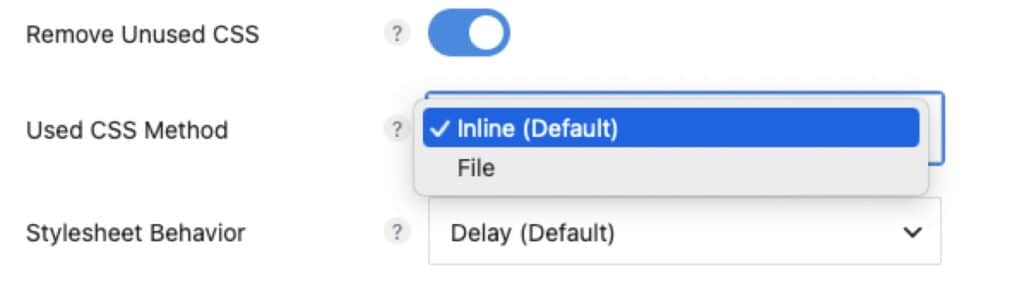
On the other hand, Perfmatters gives you a lot more control over features right there in the UI.
For example, with Remove Unused CSS, WP Rocket inlines all the used CSS. There’s no other option. This works well in most situations. But Perfmatters lets you choose between different methods so you can experiment with it.
Why this matters
If you want to be more hands-off, or if you are a beginner, you’ll likely prefer WP Rocket. You won’t need to make sense of a complicated UI with a lot of choices.
But if you are more technically-minded and like to twiddle all the knobs, Perfmatters might be your cup of tea.
The thing about automation is that is very convenient as long as everything works as expected. You can have your site optimized in a few clicks and very little manual labor.
But if anything goes wrong, it’s more difficult to customize and work around.
For example, WP Rocket’s Optimize Critical Images feature. This feature analyzes each page, determines what the LCP image is, preloads it, adds fetchpriority=high and excludes it from LazyLoad.
But, if for any reason it detects a different image than PageSpeed does, there’s very little you can do about it. There is no code snippet to exclude an image or specify one as the LCP.
Whereas with Perfmatters you can specify images to be excluded from preloading.
As a speed optimization professional, I sometimes need to disable that feature in WP Rocket and handle it with Perfmatters instead, so that I can make sure the correct image is preloaded on all the important pages.
Script Management
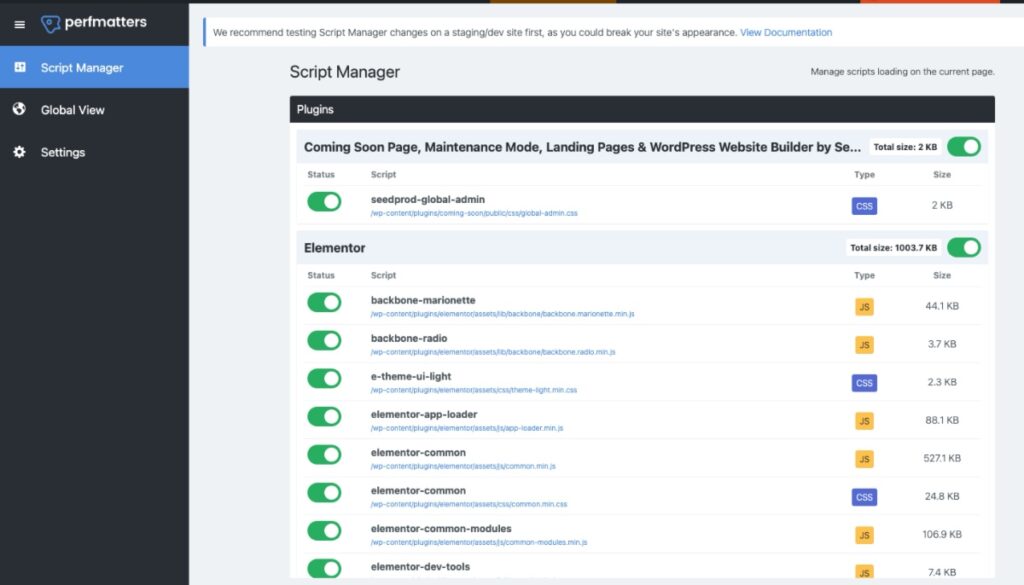
This is a significant feature that Perfmatters has that WP Rocket does not, and likely won’t add. It lets you unload scripts from pages where they are not needed. This can be an effective performance fine-tuning method and a compelling reason to add Perfmatters.
Similarities and Overlap
WP Rocket and Perfmatters do offer overlapping optimization features.
Both plugins offer these fundamental optimizations:
- CSS and JS minification
- Delay and Defer JavaScript
- Remove Unused CSS
- LazyLoading images and iframes
- Image and font preloading
- Database Optimizaton
You can use both plugins at the same time, as long as you don’t enable duplicate optimizations in each.
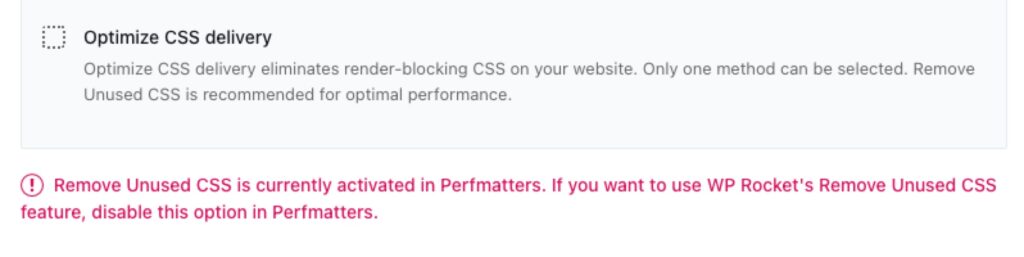
WP Rocket will detect when some duplicate features of Perfmatters are already enabled and prevent collisions:
Feature comparison
Features in both plugins are always changing so this doesn’t cover every detail, but the most important features.
| Feature | WP Rocket | Perfmatters |
|---|---|---|
| Page caching | Yes | No |
| CSS and JS minification | Yes | Yes |
| Delay and Defer JavaScript | Yes | Yes |
| Remove Unused CSS | Yes | Yes, with various methods |
| Script manager | No | Yes |
| Database optimization | Yes | Yes |
| LazyLoad Images and Iframes | Yes | Yes |
| LazyLoad DOM elements | Yes, automatically, limited effectiveness | Yes, manually select the elements |
| Quick tweaks* | No | Yes |
| Code snippets manager | No | Yes |
| Preload images | Yes, automatically | Yes, automatic and manual options |
| Preload fonts | Yes, automatically | Yes, manually |
| Actively developed | Yes | Yes |
| Prefetch/Preconnect | Yes, automatically | Yes, manually |
| Local host Google Fonts | Yes | Yes |
| CDN Rewrite | Yes | Yes |
| Browser caching and GZIP rules | Yes | No |
*The Quick Tweaks are the features like disabling little bits of WordPress code which often aren’t necessary, for example Disable Dashicons, Hide WP Version etc.
These don’t make a huge difference to overall performance but again, if you like having total control you’ll probably appreciate that.
Conclusion
You don’t need to choose between WP Rocket and Perfmatters, it’s entirely possible to use both plugins together.
Keep these considerations in mind:
- Don’t use Perfmatters without a page cache
- Don’t enable the same optimizations in both plugins
- Use WP Rocket in cases where you want to take advantage of automated features and a hands-off approach
- Use Perfmatters when you need or want more granular control.
I often start with WP Rocket and if I need to do some tweaking beyond the controls it offers me, I’ll add Perfmatters as well to get the optimal performance.
It’s a matter of choosing the right tools for the job. In some cases one or other will be enough by themselves.